
HD 12c Financial Calculator3.1.0 - Get APK
You'll be able to download in few seconds.
Publisher Description
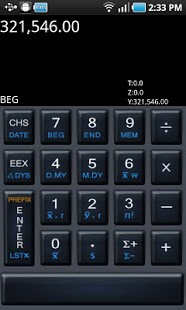
HD 12c financial calculator emulates HP 12c financial calculator for Android mobile phones. It fully implements the functionality and financial formulas of HP 12c.
***** Recommended by the American Association of Individual Investors *****
http://www.aaii.com/computerized-investing/article/hd-12c-financial-calculator
***** HP 12C User Guide available from the link below *****
http://www.hd12c.com/downloads.html
Features:
* Time value of money (loans, savings, and leasing)
* Amortization
* Bond price and yield to maturity
* Cash flow analysis NPV, IRR
* Memory for up to 20 cash flows
* SL, DB, SOYD depreciation methods
* Percentage change, percentage of total
* Cumulative statistical analysis
* Std. deviation, mean, weighted mean
* Linear regression
* Forecasting, correlation coefficient
* Total, ∑x, ∑x2, ∑y, ∑y2, ∑xy
* +, -, x, %, ÷, 1/x, ±, LN, ex, n!
* Date arithmetic
* Keystroke programming
* Program memory capacity: 99 steps
* More...
In addition to providing all the functionality of Hp 12c financial calculator, HD 12c financial calculator has the following extra features:
* SWIPE-able keypad provides a big keypad on small screen Android mobile phones.
* X, Y, Z, T register values are all displayed on screen.
* Customisable screen orientation
* Save/load programs to/from your mobile phone’s SD card
* Settings to enable/disable key click and vibration
* Memories are not converted to store program steps
* Configurable 10 or 12 or 14 digit display
* Help available on each of the keys
* Supports nearly all the screen sizes
If you need any help or have any questions, please feel free to email me hanlin.day@gmail.com.
Please consider the time difference between countries and allow 24 hours for support to respond to your request.
About HD 12c Financial Calculator
The company that develops HD 12c Financial Calculator is Mercury Technologies. The latest version released by its developer is 3.1.0.
To install HD 12c Financial Calculator on your Android device, just click the green Continue To App button above to start the installation process. The app is listed on our website since 2016-04-09 and was downloaded 0 times. We have already checked if the download link is safe, however for your own protection we recommend that you scan the downloaded app with your antivirus. Your antivirus may detect the HD 12c Financial Calculator as malware as malware if the download link to com.mertech.hd12c is broken.
How to install HD 12c Financial Calculator on your Android device:
- Click on the Continue To App button on our website. This will redirect you to Google Play.
- Once the HD 12c Financial Calculator is shown in the Google Play listing of your Android device, you can start its download and installation. Tap on the Install button located below the search bar and to the right of the app icon.
- A pop-up window with the permissions required by HD 12c Financial Calculator will be shown. Click on Accept to continue the process.
- HD 12c Financial Calculator will be downloaded onto your device, displaying a progress. Once the download completes, the installation will start and you'll get a notification after the installation is finished.
Program Details
System requirements
Download information
Pricing
Version History
version 3.1.0
posted on 2016-04-09
Version 1.8.0,Email results
version 1.2.1
posted on 2011-05-18
Several fixes and updates
Disclaimer
External Download
We do not host HD 12c Financial Calculator on our servers. We did not scan it for viruses, adware, spyware or other type of malware. This app is hosted by Galad and passed their terms and conditions to be listed there. We recommend caution when installing it.
The APK Download link for HD 12c Financial Calculator is provided to you by apps112.com without any warranties, representations or guarantees of any kind, so access it at your own risk.
If you have questions regarding this particular app contact the publisher directly. For questions about the functionalities of apps112.com contact us.
